|
IECM 13.1 User Manual > Installing the IECM > Installation > Installing the IECM on MacOS, Linux and ChromeOS > CrossOver > Portable Version > Create a Bottle (optional) |
|
You will need to choose a bottle in which to run the IECM. If you already have a suitable bottle, you may skip to the next page; otherwise, you will need to create one.
To create a bottle, select New Bottle... from the Bottle menu:
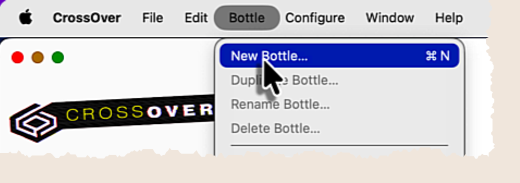
Create a New Bottle
CrossOver will pop up a dialog to allow you to specify the name and type of the new bottle:
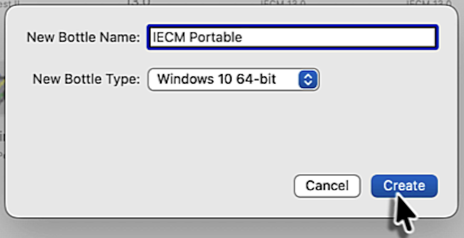
The New Bottle dialog
You may use whatever name you like; we'll call ours "IECM Portable". We're using the default bottle type, which is currently "Windows 10 64-bit". We have in the past had trouble with Windows 10 bottles under Linux; if you have trouble with it, a Windows 7 64-bit bottle should work.
Click Create to create the bottle.
Copyright © 2022-2026 University of Wyoming. All rights reserved. Visit us at https://www.iecm-online.com/