|
IECM 13.1 User Manual > Installing the IECM > Installation > Installing the IECM on MacOS, Linux and ChromeOS > CrossOver > Portable Version > Copy the IECM into the Bottle (optional) |
|
You may want to copy the IECM into your bottle. If you prefer to run it in its current location, you may skip to the next page.
On the right side of the window, under "Bottle Actions", click "Open C: Drive" to open the C: drive associated with your selected bottle:
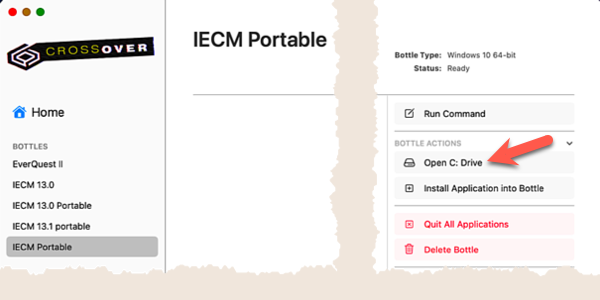
Open the Bottle's C Drive
The C: drive will be opened in your operating system's default file manager. If you're on a mac, it will open in the Finder. Locate the IECM folder in another window and copy (or move) it into the C: drive the same as you would copy or move any other folder.
|
Note: |
|
Special folders like Documents will generally be linked to the corresponding folder in your account, and are not contained in the bottle. |
Copyright © 2022-2026 University of Wyoming. All rights reserved. Visit us at https://www.iecm-online.com/