Stay Alert - Phishing Attempts Grow More Advanced
As we start the new year, we want to bring to your attention the increasing sophistication of email phishing attempts targeting our community. Cybercriminals are constantly evolving their tactics to deceive even the most cautious individuals. It is crucial that we all remain vigilant and informed to protect our personal and university data.
UWyo was recently targeted with a new form of phishing attempt that utilized a QR code to try and direct individuals to a fake Wyologin page that asked for their username, password, and phone number. Below is a screen shot of the email.
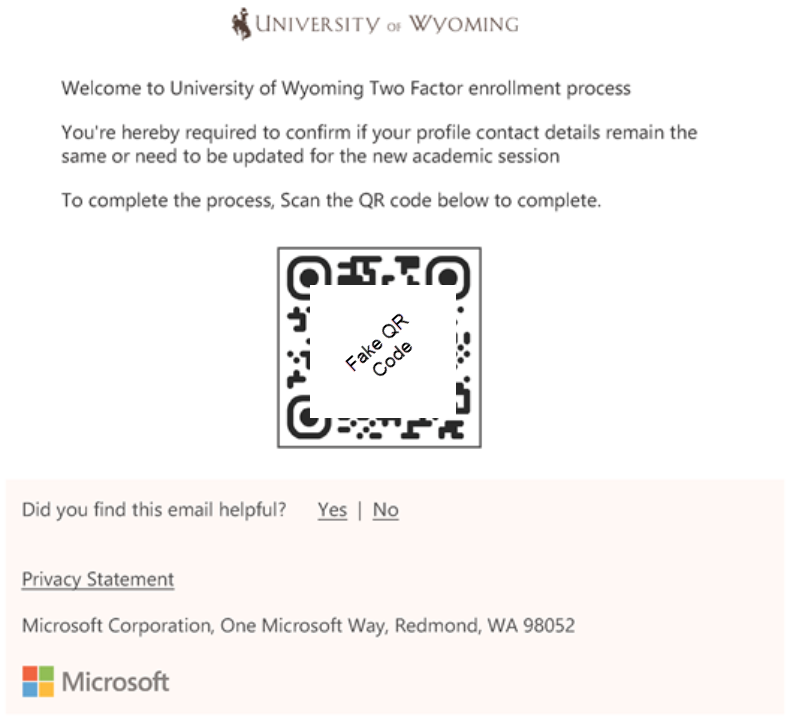
If the QR code was scanned, it would direct the individual to a fake login page resembling our WyoLogin page, asking for their username, password, and phone number. Note that the UWyo page does not require a phone number for login and the password will never be displayed in plain text. If the individual entered their username, password, and phone number, their account would be compromised immediately.
The attacker would then attempt to log in, triggering a DUO two-factor verification request to the individual's device configured for UWyo two-factor authentication. Additionally, the attacker would send a text message asking the individual to approve the request by using the 6 digit code they provided. UWyo will never text you a passcode to authenticate your DUO Verification.
This situation highlights the importance of using two-factor authentication to protect accounts. If you are not actively logging into UWyo systems, do not approve any DUO two-factor authentication requests.
UWIT will never ask for your credentials via email and we will never text you the DUO passcode. We would like to remind our campus community to always be cautious when receiving email.
What to watch for:
- Check the Sender's Email Address: Always verify the sender's email address. Phishers often use addresses that look similar to legitimate ones but may have slight variations.
- Beware of Urgent or Threatening Language: Phishing emails often create a sense of urgency or fear, urging you to act quickly. Take a moment to verify the legitimacy of such messages.
- Inspect Links Before Clicking: Hover over any links to see the actual URL. If it looks suspicious or doesn't match the context of the email, do not click on it.
- Avoid Opening Attachments from Unknown Senders: Attachments can contain malware. Only open attachments from trusted sources and be wary of unexpected files.
- Legitimate UW Communications: UW will never ask you to log in through Wyologin with your username, password, and cell phone number. The WyoLogin page will never display your password in plain text.
- DUO Verification Alerts: If you receive a DUO verification request and you are not actively logging in, do not approve it. If you receive a separate text message asking you to approve and it provides you with the DUO passcode, do not approve it. Report it as fraud immediately.
What you should do:
- Do Not Click on any suspicious links or download attachments.
- Verify the sender through official channels if in doubt.
- Report phishing emails immediately by forwarding them to userhelp@uwyo.edu.
For more information on phishing at the University of Wyoming view the UWIT Knowledge Base here.