

HOLD FOR ME
Available to all Libraries patrons
Request circulating items from our collection. We’ll retrieve available items and deliver them to the library of your choice to pick up.
- Sign in to My Account.
- Locate the item in QuickSearch.
- Select Hold for Me.
- Choose your preferred pickup location, and submit your request.
Holds placed on checked out items will be held for you upon return. Need items sooner? UW students and employees can request through Interlibrary Loan or Prospector.
SCAN FOR ME
Available to UW students and employees
Request articles and book chapters from items on our shelves. We’ll scan pages and deliver to you electronically.
- Sign in to your My Account account.
- Locate the item in QuickSearch.
- Select Request through Interlibrary Loan.
- You’ll be redirected to your Interlibrary Loan account to request a scan.
- In the Notes field, add the page numbers or section you’d like scanned, and submit your request
Copyright guidelines limit the amount of an item that can be scanned.
Borrow Beyond UW: Interlibrary Loan
Request articles, book chapters, books, e-books, media, maps, and more from libraries
worldwide.
- Sign in to your Interlibrary Loan account.
- Select either Article/Chapter or Books & Media request.
- Enter citation information.
- Submit your request.
Located outside of Laramie? You can use this account to request circulating items from our physical collection and libraries worldwide. Requested items will be mailed to you.
Expand your search results with Libraries QuickSearch:
- Sign in to My Account.
- Begin searching in QuickSearch.
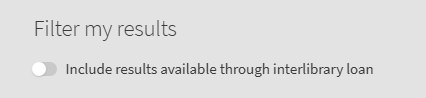
- Toggle “Include results available through interlibrary loan”.
- On results with “No Online Access”, click on Request through Interlibrary Loan.
- In select instances, you may see an option for immediate access (or Need it Now?). This option appears on content when UW Libraries may be able to purchase one-time access to the item for your individual use. In these cases, the PDF will be emailed to you and typically arrives within an hour.
Borrow Beyond UW: Prospector
Request books, e-books, media, maps, and more from academic and public libraries in our region.
- Search and request items in the Prospector shared catalog.
- Once you’ve located an item, click on Request It.
- Select Alliance – University of Wyoming as your institution.
- Follow the directions for entering your name and W number.
- Choose your preferred pickup location, and submit your request.
View your Prospector requests and loans in My Account.
Suggest a Purchase
Still can’t find it? Submit a Suggest a Purchase request, and we’ll consider adding the item to our collection.
STill Need Help?
To learn more, see our Circulation Policies and Frequently Asked Questions (FAQS) for Interlibrary Loan and Prospector.
Contact Us!
(307) 766-3190
libcirc@uwyo.edu


The University of Wyoming has earned its Research Level 1 (R1) status from the Carnegie
Classification of Institutions of Higher Education, placing Wyoming's only four-year
university among the top research universities in the United States.
The University of Wyoming Libraries has been a Federal Depository Library since 1907. The collection comprises approximately 1.5 million print and microfiche
items in Coe Library and Library Annex, as well as maps, aerial and infrared photographs,
and geological publications housed in the Brinkerhoff Geology Library. The Federal
Document Library Program is changing from physical to digital distribution of government
information; UW Libraries provides access to online publications available from the
Federal Depository Library Program through the library catalog.