

Publishing Tools and Environments
Before you publish, it helps to understand where your edits live and what control you have over when they go live.
Staging vs. Production
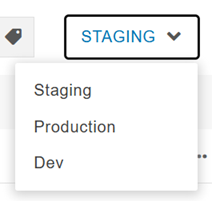
Modern Campus CMS uses a staging server as your editing environment, kept separate
from the production server where pages go live. Staging is the default view and the
one you should always work in. You can toggle to the Production and Dev views to grab
their URLs, but you can't edit anything from them. Visit the Staging vs. Production
page to learn how the environments differ.
Scheduling Publishing
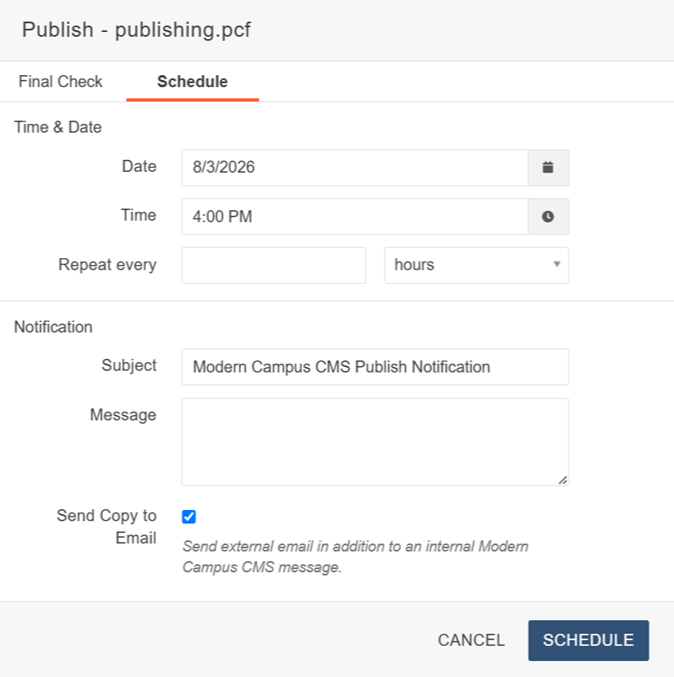
The Schedule feature lets you publish a page at a future date and time instead of
right away. You can set a specific date, create a recurring schedule, and get a notification
in your CMS inbox and by email once it runs. Scheduling works well for pages tied
to an event or other time-sensitive content. Visit the Scheduling Publishing page
for setup steps.

The University of Wyoming has earned its Research Level 1 (R1) status from the Carnegie Classification of Institutions of Higher Education, placing Wyoming's only four-year university with the top research universities in the United States.